Wow! Build your WhatsApp integration. Start free. Register Now
HubSpot event → action · WhatsApp API use case

Send WhatsApp chat text from a HubSpot event

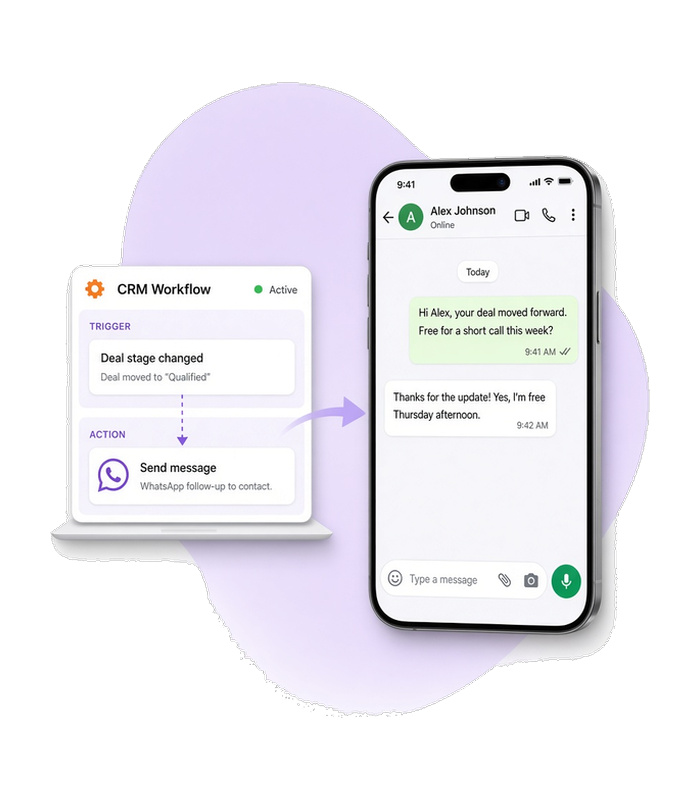
The enrolled contact gets a WhatsApp text when HubSpot fires the event. When a form submit, deal stage change, or contact property change enrolls them, your automation can map the phone and body and send that text through Whapi.Cloud. This use case shows integrators how to implement that flow through the WhatsApp API.

Triggered by a HubSpot workflow event Text lands in the contact's personal chat
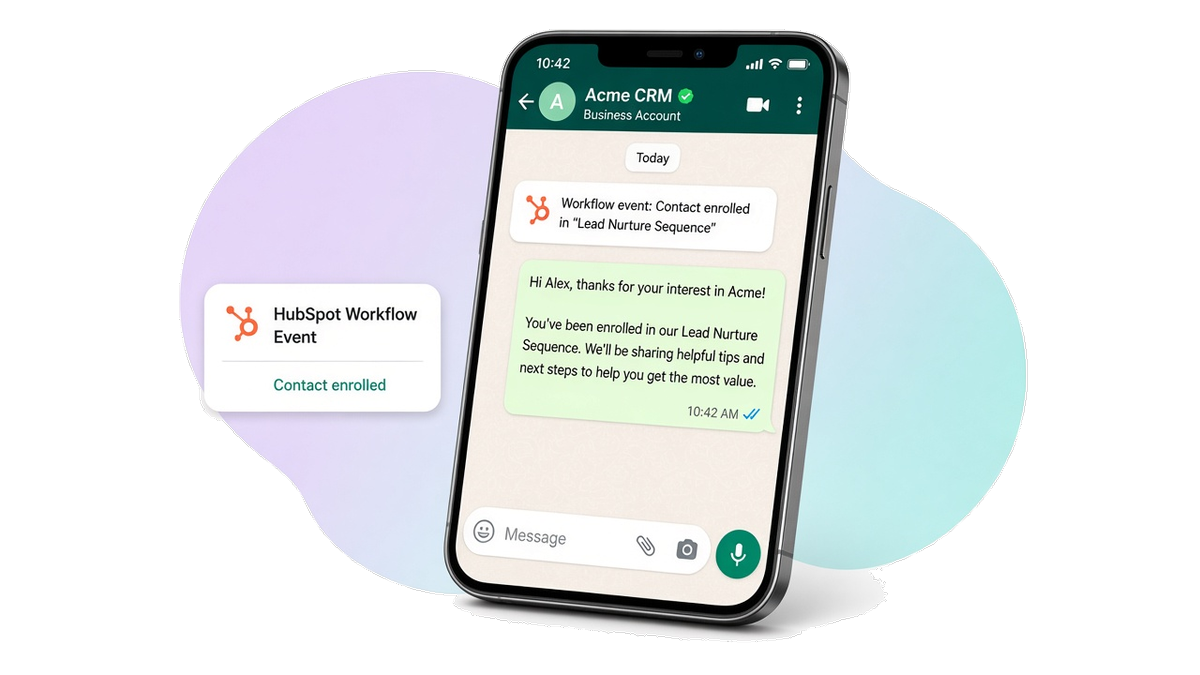
Laptop showing a HubSpot workflow enrollment beside a phone with a WhatsApp chat that just received the mapped follow-up text.
Decorartive bubble
Use case

When to use this flow

HubSpot already owns the enrollment event

Use this flow when a HubSpot workflow event (form, deal stage, or property change) is the source of truth for who should be messaged.

The action is one personal chat text

Use this flow when the enrolled contact should receive ordinary chat text in a direct chat, not a group invite and not a channel post.

The send should run without a human paste

Use this flow when sales or ops should not open WhatsApp to copy a number and paste a follow-up after HubSpot already enrolled the contact.

WhatsApp chat on a phone showing the follow-up text that arrived after a HubSpot workflow event for that contact.
Customer experience

The contact gets the follow-up in chat

Before automation, HubSpot already knows the event, but the contact waits while someone opens WhatsApp and types the follow-up by hand, so many enrollments never get a message.

After the flow runs, the enrolled contact sees the mapped WhatsApp text for that HubSpot event. Integrators build this result with the WhatsApp API.

Workflow

From a HubSpot event to one text

1

HubSpot workflow event

HubSpot fires the enrolled event and exposes the contact phone and the message body your action mapped. Whapi.Cloud does not host the HubSpot workflow.

2

Send the mapped chat text

POST /messages/text

sendMessageText posts that body to the contact phone as ordinary message text.

Need delivery tracking? A successful send response is not proof the contact already has the message. Track later acks on delivery webhooks. Learn about delivery status →

Prerequisites

Before you run the flow

Connect the WhatsApp number that should send the HubSpot follow-up, and authenticate every request with that number's API token. HubSpot enrollment and action mapping stay in HubSpot or your automation tool.

Optional — go deeper for this flow

API implementation

The call that sends the text

Your HubSpot event already named the contact and the message you want to send. This call delivers that mapped body to the contact's WhatsApp number.

Get your API token for free after you register on whapi.cloud, and use that token in the code instead of Your_Token from the examples.

Send the mapped chat text

{NS}.API_HUB.STEP_1_PURPOSE

curl --request POST \
     --url https://gate.whapi.cloud/messages/text \
     --header 'accept: application/json' \
     --header 'authorization: Bearer Your_Token' \
     --header 'content-type: application/json' \
     --data '
{
  "to": "15052462002",
  "body": "Hello"
}
'
$curl = curl_init();

curl_setopt_array($curl, [
  CURLOPT_URL => "https://gate.whapi.cloud/messages/text",
  CURLOPT_RETURNTRANSFER => true,
  CURLOPT_CUSTOMREQUEST => "POST",
  CURLOPT_POSTFIELDS => "{  \"to\": \"15052462002\",  \"body\": \"Hello\"}",
  CURLOPT_HTTPHEADER => [
    "accept: application/json",
    "authorization: Bearer Your_Token",
    "content-type: application/json"
  ],
]);

$response = curl_exec($curl);
curl_close($curl);
echo $response;
import requests

url = "https://gate.whapi.cloud/messages/text"
payload = {"to": "15052462002", "body": "Hello"}
headers = {
    "accept": "application/json",
    "authorization": "Bearer Your_Token",
    "content-type": "application/json"
}

response = requests.request("POST", url, json=payload, headers=headers)
print(response.text)
const response = await fetch("https://gate.whapi.cloud/messages/text", {
  method: "POST",
  headers: {
    accept: "application/json",
    authorization: "Bearer Your_Token",
    "content-type": "application/json"
  },
  body: JSON.stringify({ to: "15052462002", body: "Hello" })
});

console.log(await response.text());
OkHttpClient client = new OkHttpClient();

MediaType mediaType = MediaType.parse("application/json");
RequestBody body = RequestBody.create(mediaType, "{  \"to\": \"15052462002\",  \"body\": \"Hello\"}");
Request request = new Request.Builder()
  .url("https://gate.whapi.cloud/messages/text")
  .method("POST", body)
  .addHeader("accept", "application/json")
  .addHeader("authorization", "Bearer Your_Token")
  .addHeader("content-type", "application/json")
  .build();

Response response = client.newCall(request).execute();
using RestSharp;

var options = new RestClientOptions("https://gate.whapi.cloud/messages/text");
var client = new RestClient(options);
var request = new RestRequest("");
request.AddHeader("accept", "application/json");
request.AddHeader("authorization", "Bearer Your_Token");
request.AddHeader("content-type", "application/json");
request.AddJsonBody(new { to = "15052462002", body = "Hello" });
var response = await client.ExecuteAsync(request);

Console.WriteLine("{0}", response.Content);
package main

import (
	"bytes"
	"fmt"
	"io"
	"net/http"
)

func main() {
	body := []byte(`{
  "to": "15052462002",
  "body": "Hello"
}`)
	req, _ := http.NewRequest("POST", "https://gate.whapi.cloud/messages/text", bytes.NewReader(body))
	req.Header.Set("accept", "application/json")
	req.Header.Set("authorization", "Bearer Your_Token")
	req.Header.Set("content-type", "application/json")

	res, _ := http.DefaultClient.Do(req)
	defer res.Body.Close()
	out, _ := io.ReadAll(res.Body)
	fmt.Println(string(out))
}
Delivery status

When the text leaves pending

A successful send response does not mean the contact already has the message. The first status visible before a webhook is pending. Later status changes arrive only on statuses.post and statuses.put. If the status stays pending and does not move to sent, delivered, or a later ack, the message was not delivered—check the payload and the account's permission to send that type.

  • Treat a stuck pending as not delivered, not as a clock or a queue waiting on a webhook.

  • Subscribe to statuses.post and statuses.put when you need sent, delivered, or read confirmation for the HubSpot action.

  • Do not mark the HubSpot action completed while the WhatsApp status stays pending.

What to read on delivery and webhooks

Contact our support if something went wrong
When things break

Handle failures at each step

If HubSpot already fired the event but the contact has no usable phone, the send is rejected, or the message is not delivered, retry or alert and do not mark the HubSpot action as completed.

HubSpot fired, but WhatsApp never arrived?

Keep the HubSpot enrollment separate from WhatsApp delivery. Fix a missing phone in the payload, retry sendMessageText, or alert the team—do not mark the HubSpot action completed while the contact still has no text. If the send still fails after a retry, contact Whapi support with the channel id and the failed request id.

Contact our support if something went wrong

Troubleshoot by API step

Status What it means What to do
200 Created
400 Wrong request parameters Fix wrong request parameters in the send body before retrying.
401 Need channel authorization for send message Authorize the channel for send message, then retry with a valid token.
402 Trial version limit exceeded
403 It is forbidden to send to this group/recipient Confirm it is allowed to send to this recipient, then retry with a corrected to value.
413 Request body too large
429 Too many requests Slow down and retry later after too many requests.
500 Internal Error
FAQ

HubSpot events and WhatsApp text

No. HubSpot owns enrollment and the Event → Action map. Your automation or backend reads the contact phone and message body from that event, then calls sendMessageText through Whapi.Cloud.
Yes. Many integrators catch the HubSpot event in Make or n8n, map the phone and body, then call the Whapi send action. This page stays on the WhatsApp send step; Make and n8n setup live in their own guides.
Treat it as the catalog failure_mode—do not call sendMessageText, alert or enrich the contact, and do not mark the HubSpot action as completed.
No. That flow validates whether numbers are on WhatsApp before a mailing or import. This flow sends mapped chat text after a HubSpot workflow event for an enrolled contact.
Supported WhatsApp Features

Everything you need to build WhatsApp automation

Whapi.Cloud gives you access to a complete set of WhatsApp features — messaging, media, groups, channels, webhooks and more. Build bots, automations and integrations without feature limitations.

Chosen by developers

Trusted by 3,300+ developers and SaaS teams

Developers worldwide rely on Whapi.Cloud to build automations, bots, CRM integrations, bulk messaging tools and advanced WhatsApp workflows. Our infrastructure processes millions of API requests with high stability — and grows every month.

Icon of feature

5,5K+

active API channels

Icon of feature

21M+

API requests processed monthly

“Everything is simple, intuitive and easy to navigate. The docs are clear, and all the info I need is right on the screen. Great job.”

roberto k. / Web Developer

“We connected WhatsApp to our workflows using n8n in just a few minutes. No code, no complications- everything worked on the first try.”

Martin p. / Developer

“Whapi.Cloud became a key part of our customer communication. We automated product updates, order notifications and support messages without needing Meta templates or approvals”

Oscar T. / CTO

Decorative bubble