Wow! Build your WhatsApp integration. Start free. Register Now
Instant messaging, groups and automation — without backend setup

MCP for WhatsApp in AI Agents

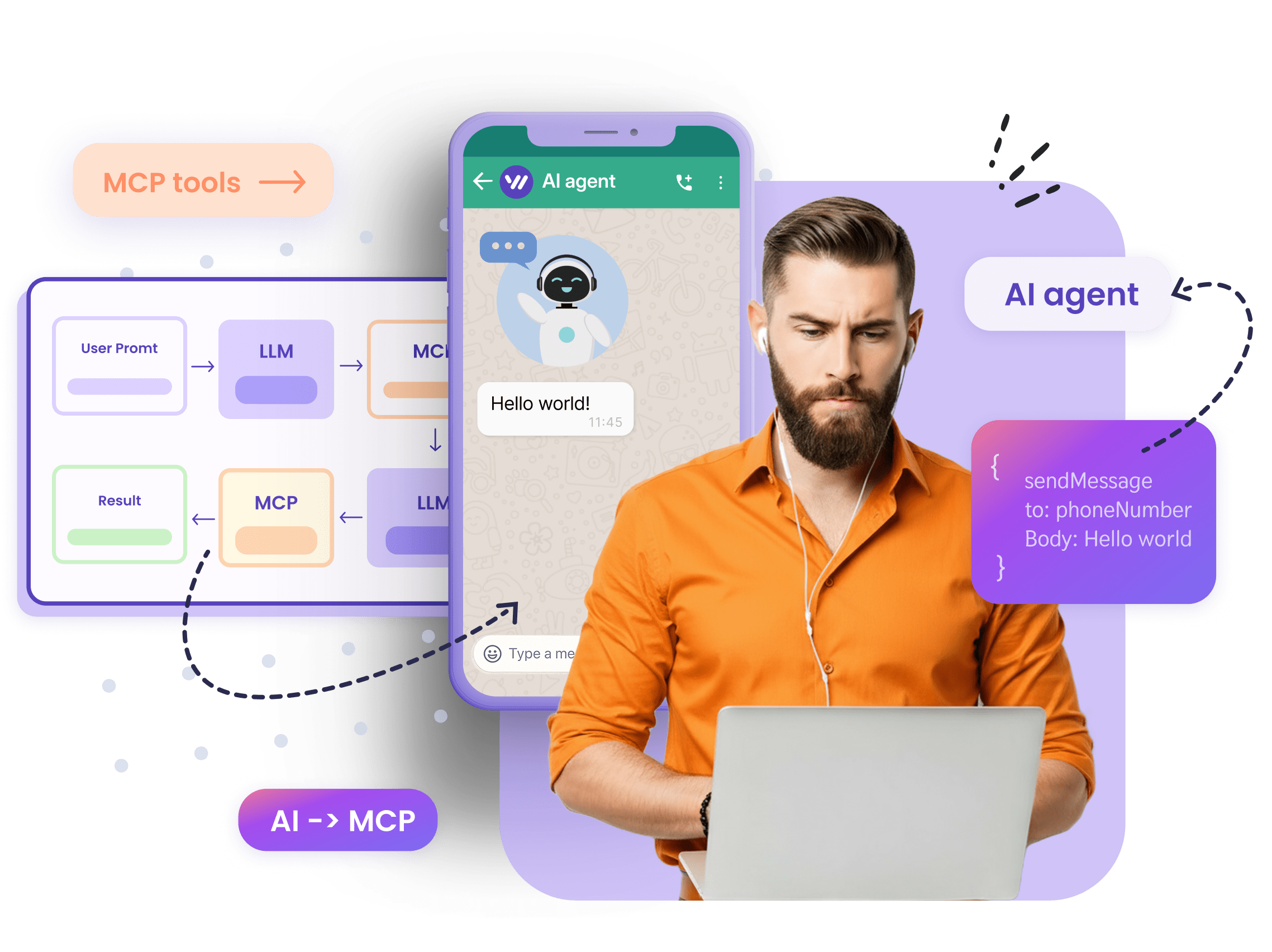
Let your AI agent send messages, create and manage groups, post to channels, and react to incoming conversations via WhatsApp — all through simple MCP tools. Designed for AI agents, automation builders, and teams working with LLM-powered workflows.

Works with MCP-enabled AI agents Live support to help
mcp WhatsApp Integration
Decorartive bubble
Use any WhatsApp number you already own; no Meta verification required.

How to use?

Icon

Pair a number

Connect your or any other number via QR code and get your Whapi token

Icon

Connect MCP

Follow our knowledge-base guide to start the server locally, or connect MCP to Cursor or Claude Desktop.

Icon

Send a WhatsApp command

Ask your agent to “send a message”, “create a group”, or “get posts from channel” — the automation runs instantly.

Whatsapp API for AI Agents

Start in Minutes. Built for Agents

Spin up locally or inside your agent-enabled IDE and issue WhatsApp commands with zero server setup. MCP tools invoke Whapi endpoints directly, so you can test sends and receive events within minutes.

  • Works with Cursor, Claude Code, Claude Desktop, Codex, VS Code, and other MCP-ready assistants.

  • Open standard — not locked to any single AI provider.

  • The MCP server runs locally on your machine and talks to the Whapi API over HTTPS.

Ready-to-Run MCP Tools

Once MCP is connected, the same WhatsApp actions are available in the editor: send, groups, channels, number checks. Use it to try a flow, validate an MVP, or run a test on a real number before you commit to a full product.

  • Send texts, images, and quick-reply buttons from your agent;

  • Create or manage groups and channels through a single call;

  • Validate WhatsApp numbers or automate replies without any code;

WhatsApp API for MCP
Automate WhatsApp using AI and MCP

Four high-impact use cases

Your AI agent isn’t limited to sending messages — it can manage full WhatsApp experiences. Create and control group chats for communities or teams, post updates to channels for broadcast communication, and share status stories to keep audiences engaged. Each action uses the same simple command pattern, so your agent handles complex workflows as easily as sending a text.

When a user joins a WhatsApp group, your agent sends a welcome message, checks their profile or CRM entry, applies tags, and posts group rules. It can also auto-moderate messages that break the policy.

Monitor a Telegram channel, RSS feed, or e-commerce site for new items, and automatically post curated updates or product picks to your WhatsApp channel.

Publish status stories with new offers or event teasers, then capture reactions or replies to trigger follow-up messages, lead flows, or surveys.

WhatsApp chats and groups already hold unstructured decisions, files, and media. Collect 1:1 and group messages, documents, and photos, then turn them into structured facts your agent can query — with a link back to the original chat — so you can answer “what did we agree?” without scrolling phones and inboxes.

Live Support. When you need it

Behind WHAPI there are real people who know both WhatsApp and API inside out. Whether you’re an experienced developer or setting up your very first workflow, our support team will walk you through, answer questions, and share best practices.

If you're connecting MCP to tools like Cursor, Claude Desktop, or VS Code Agents, we’ll help you configure commands, handle auth tokens, and get your first WhatsApp actions running smoothly.

Using platforms such as n8n, Make, or Jenova? We’ll guide you through webhook setup, custom call configuration, and best practices to keep flows stable and safe.
line
WhatsApp API Usage
line

See What Our Clients Built
with Whapi.Cloud

“Every morning ops gets today’s Guesty check-ins as one WhatsApp message — VIP tags, late arrivals, room notes. Nobody opens the PMS dashboard first.”

Guesty-to-WhatsApp room alerts

Muhammad Hisham Akram
“We watch RSS feeds, summarize each article, generate a vertical image, and post it as a WhatsApp Story. Open rates beat email because the story is already in the app.”

RSS feed to daily WhatsApp Stories

Hamza Irshad
“Patients book, look up, and reschedule on WhatsApp 24/7. Pricing and sensitive questions never stay with the agent — they escalate to a human.”

Clinic bookings with human handoff

Thelma Ekeli Ekomboni Ekema
“Field staff log a visit in under a minute. Twice a day the WhatsApp group shows who visited, who is active, and who didn’t — problems surface in hours, not at week’s end.”

Twice-daily field-team summaries

Kenny Kwanto
“The bot answers routine WhatsApp messages, then stops the moment an emergency intent appears and routes to a person. It does not pretend to handle life-critical cases.”

Emergency detection and human escalation

Akhil Devarapu
“Exam reminders go out to thousands of students because sends are paced and content varies. A raw blast would trip WhatsApp spam limits.”

Rate-limited student reminders

Gurkirat Singh
“Gmail, WhatsApp, and web forms land in one CRM agent. Escalation stays under 25%, and WhatsApp cost stays a flat per-number fee.”

Multi-channel AI customer-success agent

Ahsen Adil
“Managing multiple WhatsApp groups is simple with Whapi.Cloud. I can oversee group activity, manage admins, and post updates effortlessly. It’s a perfect way to generate leads directly from WhatsApp groups.”

Group Management and Lead Generation from WhatsApp Groups

Carlos da Silva
“Our hotel uses WhatsApp to send guests essential check-in details like door codes. This ensures they always have the info they need. We can even process photos guests send, such as proof of checkout.”

Smart Hotel Communication for Check-In and Guest Support

Ana-Maria Ionescu
“We manage a WhatsApp Channel and use Whapi.Cloud to monitor similar channels and competitors, scraping the best deals and posting them for our audience.”

Automated Discount Channel Management

Katrin Schneider
“We use Whapi.Cloud to verify which numbers in our database are on WhatsApp by sending cascading broadcasts. This way, we filter our contacts, reduce marketing costs, and know our messages reach active users-maximizing campaign efficiency.”

WhatsApp Number Verification and Audience Filtering

Sergio Navarro
“Our hospital’s bot, powered by Whapi.Cloud, lets patients see available appointment slots for specific doctors and notifies them when test results are ready. It keeps everyone informed and reduces the time our team spends on manual updates.”

Hospital Bot for Appointment Scheduling and Notifications

Fernanda Oliveira
“We use personalized promotional offers to engage customers weeks after their purchase, sending out exclusive discount vouchers via WhatsApp. We also send a special offer for each customer’s birthday, which boosts loyalty and keeps them coming back.”

Customer Loyalty and Retention

Lukas Wagner
“As soon as an order ships, our customers get tracking details and delivery updates directly on WhatsApp. This real-time communication builds trust and reduces the number of inquiries we receive after purchase.”

Order Tracking and Delivery Updates

Matei Popescu
“If a customer leaves items in their cart on our site, WhatsApp Bot automatically sends a friendly reminder. This gentle nudge has significantly increased our checkout rate, helping us convert more sales.”

Abandoned Cart Reminders

Hans Müller

What the MCP tools do

Every WhatsApp action your agent can call — messages, groups, channels, stories, contacts, calls, and catalog — in one MCP server. Expand a group to see the full WhatsApp surface MCP can run.

  • sendMessageText — send a text message to a chat
  • sendMessageImage — send an image
  • getMessages — list messages
  • getMessagesByChatID — list messages in a chat
  • markMessageAsRead — mark a message as read
  • sendMessageDocument — send a document
  • sendMessageVideo — send a video
  • sendMessageVoice — send a voice message
  • sendMessageAudio — send an audio file
  • sendMediaMessage — send a media file
  • sendMessageInteractive — send an interactive message with buttons
  • sendMessageLinkPreview — send a link with preview
  • getMessage — get a single message
  • deleteMessage — delete a message
  • forwardMessage — forward a message
  • reactToMessage — react to a message
  • sendMessageLocation — send a location
  • sendMessagePoll — send a poll
  • sendMessageContact — send a contact card
  • sendMessageSticker — send a sticker
  • sendMessageGif — send a GIF
  • pinMessage — pin a message
  • starMessage — star a message
  • sendMessageCarousel — send a carousel
  • sendMessageContactList — send a list of contacts
  • sendMessageLiveLocation — send a live location
  • sendMessageShort — send a short video (PTV)
  • markMessageAsPlayed — mark a voice message as played
  • getMessageViewStatuses — get view statuses for a message or story
  • removeReactFromMessage — remove a reaction from a message
  • unpinMessage — unpin a message
  • sendEvent — send a scheduled event invitation
  • sendMessageQuestion — send a question to a channel
  • sendMessageQuiz — send a quiz to a channel
  • sendMessageStory — send a story message
  • sendMessageStoryText — send a text story
  • sendMessageStoryMedia — send a media story
  • sendMessageStoryAudio — send an audio story
  • commentMessage — comment on a community announcement

  • createGroup — create a WhatsApp group
  • getGroups — list groups
  • getGroup — get group details
  • addGroupParticipant — add a member to a group
  • removeGroupParticipant — remove a member from a group
  • getGroupInvite — get the group invite link
  • sendGroupInvite — send a group invite link
  • acceptGroupInvite — accept a group invite
  • updateGroupInfo — update group name or description
  • updateGroupSetting — update group settings
  • promoteToGroupAdmin — promote a member to admin
  • demoteGroupAdmin — demote a group admin
  • leaveGroup — leave a group
  • setGroupIcon — set the group icon
  • getGroupIcon — get the group icon
  • getGroupApplicationsList — list pending join requests
  • approveGroupApplicationsList — approve join requests
  • rejectGroupApplicationsList — reject join requests
  • getGroupMetadataByInviteCode — get group info from an invite code
  • revokeGroupInvite — revoke the group invite link
  • deleteGroupIcon — remove the group icon

  • createCommunity — create a community
  • getCommunities — list communities
  • getCommunity — get community details
  • addCommunityParticipant — add members to a community
  • removeCommunityParticipant — remove a member from a community
  • createGroupInCommunity — create a group inside a community
  • getCommunitySubGroups — list community subgroups
  • linkGroupToCommunity — link a group to a community
  • joinInCommunityGroup — join a group in a community
  • changeCommunitySettings — change community settings
  • promoteCommunityParticipant — promote a member to community admin
  • demoteCommunityParticipant — demote a community admin
  • createEvent — create a community event
  • unlinkGroupFromCommunity — unlink a group from a community
  • revokeCommunityInvite — revoke the community invite
  • deactivateCommunity — deactivate a community

  • createNewsletter — create a WhatsApp channel
  • getNewsletters — list channels
  • getNewsletter — get channel details
  • getMessagesNewsletter — list channel posts
  • subscribeNewsletter — follow a channel
  • unsubscribeNewsletter — unfollow a channel
  • sendNewsletterInvite — send a channel invite
  • editNewsletter — edit channel details
  • findNewsletter — find channels by filters
  • getNewsletterByInviteCode — get channel info from an invite
  • subscribeNewsletterInvite — follow a channel via invite
  • unsubscribeNewsletterInvite — unfollow a channel via invite
  • recommendedNewsletter — get recommended channels by country
  • createNewsletterAdminInvite — invite a channel admin
  • acceptNewsletterAdminRequest — accept a channel admin invite
  • demoteNewsletterAdmin — demote a channel admin
  • revokeNewsletterAdminInvite — revoke a channel admin invite
  • trackingNewsletter — subscribe to channel updates
  • addNewsletterMessagePaidPartnership — mark a channel post as paid partnership
  • deleteNewsletter — delete a channel

  • checkPhones — check if phone numbers are on WhatsApp
  • getContacts — list contacts
  • getContact — get contact details
  • addContact — add a contact
  • sendContact — send a contact card
  • getContactProfile — get a contact profile photo
  • getContactAbout — get a contact About text
  • editContact — edit a contact
  • checkExist — check if a contact exists
  • getLidById — resolve a contact LID from a WhatsApp ID
  • getLidByIds — resolve LIDs for multiple IDs
  • getIdByLid — resolve a WhatsApp ID from a LID
  • deleteContact — delete a contact

  • getChats — list chats
  • getChat — get chat details
  • archiveChat — archive or unarchive a chat
  • patchChat — pin, mute, mark read, or set disappearing messages
  • deleteChat — delete a chat

  • uploadMedia — upload media
  • getMedia — get a media file
  • getMediaFiles — list media files
  • deleteMedia — delete uploaded media

  • createStory — create and publish a story
  • createStoryText — post a text story
  • createStoryMedia — post a media story
  • getStories — list stories
  • getStory — get a story
  • createStoryAudio — post an audio story
  • copyStory — copy an existing story

  • sendPresence — send typing or recording presence
  • sendMePresence — set your online or offline status
  • getPresence — get online or typing presence
  • subscribePresence — subscribe to presence updates

  • getLabels — list labels
  • createLabel — create a label
  • addLabelAssociation — attach a label to a chat or message
  • getLabelAssociations — list items with a label
  • renameLabel — rename a label
  • deleteLabelAssociation — remove a label from a chat or message
  • deleteLabel — delete a label

  • getProducts — list catalog products
  • sendProduct — send a catalog product
  • sendCatalog — send a catalog to a contact
  • createProduct — create a catalog product
  • getProduct — get a product
  • updateProduct — update a product
  • getBusinessProfile — get the business profile
  • editBusinessProfile — edit the business profile
  • getCollectionsList — list collections
  • createCollection — create a product collection
  • getCollection — get a collection
  • getCollectionProductList — list products in a collection
  • editCollection — edit a collection
  • getContactProducts — list a contact’s catalog products
  • getOrderItems — get items in an order
  • getNewChatLimit — get the new-chat limit
  • getReachoutTimelock — get the reachout timelock status
  • deleteProduct — delete a product
  • deleteCollection — delete a collection

  • checkHealth — check channel health and launch it
  • loginUser — start login and get a QR as base64
  • loginUserImage — start login and get a QR image
  • getUserProfile — get the user profile
  • getChannelSettings — get channel settings
  • updateChannelSettings — update channel settings
  • getLimits — get account limits
  • webhookTest — send a test webhook
  • getAllowedEvents — list allowed webhook events
  • logoutUser — log out the session
  • updateUserProfile — update the user profile
  • getUsername — get the account username
  • setUsername — set the account username
  • getAccountRegistrationDate — get the account registration date
  • loginUserViaAuthCode — get a login auth code by phone number
  • loginUserRowData — start login and get QR row data
  • loginUserPasskeyChrome — complete login with a Chrome passkey
  • loginUserPasskeyNid — complete login with an automatic NID passkey
  • loginUserPasskeyPaste — complete login with a pasted passkey
  • resetChannelSettings — reset channel settings

  • getBlackList — list blacklisted contacts
  • blacklistAdd — add a contact to the blacklist
  • blacklistRemove — remove a contact from the blacklist

  • makeCall — start an attention call
  • rejectCall — reject an incoming call
  • getCall — get call details
  • createGroupCallLink — create a group video call link
  • createCallEvent — create a call event

  • sendBotMessage — send a text message to an AI bot
  • getBotList — list WhatsApp bots
Supported WhatsApp Features

Everything you need to build WhatsApp automation

Whapi.Cloud gives you access to a complete set of WhatsApp features — messaging, media, groups, channels, webhooks and more. Build bots, automations and integrations without feature limitations.

Inhouse Developed & Managed

What is Whapi.Cloud?

Straightforward and powerful! Whapi.Cloud is an intuitive API that enables you to seamlessly connect your business with WhatsApp.
With Whapi.Cloud, you can focus on what really matters – growing your business.
Enjoy endless integration possibilities, such as building support bots, scheduling appointments, sending WhatsApp notifications, and so much more.
Plus, monitor everything effortlessly with webhooks. Getting started has never been easier!

Our service provides full control and management of WhatsApp groups, communities and channels.

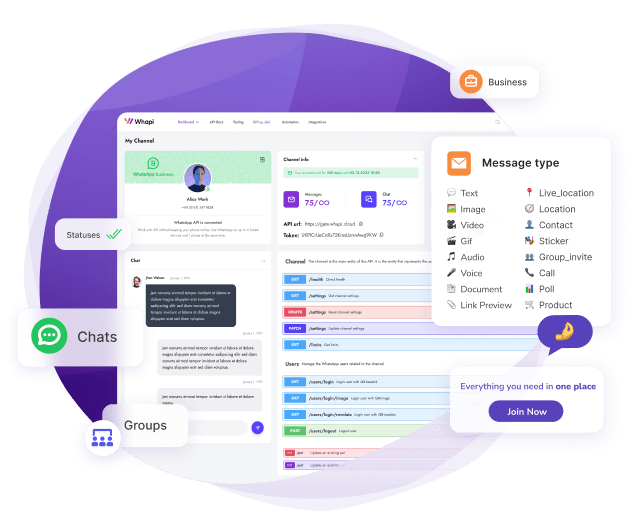
Add dynamics and new features: media, buttons, reactions, stories, orders and products. All of these are available to you for customer interaction.

Our care team will respond quickly and help you with any questions you may have!
Account screenshot
Account screenshot
Decorartive bubble

What Is MCP (Model Context Protocol) and Why It Matters

The Model Context Protocol (MCP) is an emerging open standard that lets AI agents securely access tools, APIs, and external data through a unified interface. Instead of writing custom integrations or backend logic, MCP bridges your local or cloud tools directly to the AI model — giving it controlled, structured access to real-world functions.
When combined with Whapi.Cloud’s WhatsApp API, MCP enables agents to send messages, manage groups, post to channels, or trigger workflows instantly. It transforms WhatsApp automation from code-heavy development into a plug-and-run experience.
In short, MCP brings the missing layer of intelligence between your AI agent and Whapi’s powerful WhatsApp API — letting you build, test, and scale automations faster than ever.
Zero backend: no server or SDK setup — the agent handles all requests.
Faster MVPs: go from concept to working WhatsApp automation in minutes.
Secure context: your tokens and configurations stay local to the agent.
AI-ready architecture: works natively with tools like Cursor, Claude Desktop, Azure AI Foundry, and Jenova.
Whapi.Cloud - Get started for free!

WhatsApp API Pricing

Billed monthly

Billed annually

Developer Sandbox

Free for Development

Full API functionality for testing and development, with usage limits applied

  • Up to 5 active conversations per month

  • Up to 150 messages per day

  • Up to 30 WhatsApp number checks per day

  • Up to 1,000 API requests per month

  • Periodic activity required

  • Standard support (non-priority)

Start Free Trial
Developer Premium

$29 / month

$40
33% off

A stable and reliable service for production workloads with priority support

  • Unlimited messaging & media

  • Full access to Groups, Channels & Webhooks

  • No per-message charges

  • Priority live support & faster incident handling

  • Automatic number warming module

  • Built-in tools and automation integrations

  • Suitable for long-term, stable production workflows

Price per WhatsApp number. Discounts for multiple numbers.

Selected: 1

1

Price For Number

Start Free Trial
5-day
trial