Wow! Build your WhatsApp integration. Start free. Register Now
Group join moderation · WhatsApp API use case

Clear WhatsApp group join requests from your backend

Paid clubs and private communities stop losing applicants when join queues sit on a phone. When someone requests access to an approval-only group, your backend can react to a groups.put webhook, list pending applications, and admit or reject each one through Whapi.Cloud. This use case shows integrators how to implement that flow through the WhatsApp API.

groups.put webhook with action request GET pending applications, then POST or DELETE per id
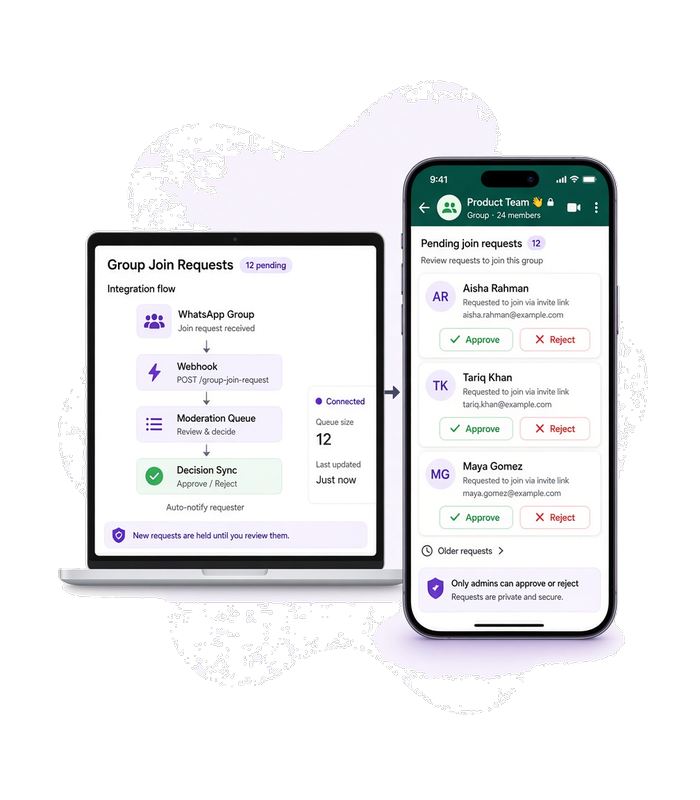
Laptop with an integration diagram beside a phone showing a WhatsApp group admin view and a short queue of pending join requests.
Use case

When to use this flow

The group requires approval before someone enters

Use this flow when the WhatsApp group is not open join—someone taps the invite link and creates a join request that an admin would normally approve or deny in the app.

Moderation rules live in your backend

Use this flow when own_backend decides who gets in (paid member list, referral code, manual allowlist) and you need a stable HTTP path instead of copying taps from a phone.

You run several approval-only groups

Use this flow when join requests stack up across groups or outside working hours and you want one integration pattern for list, approve, and reject.

WhatsApp group info screen on a phone showing a join request resolved—either the member appears in the participant list or the pending request is gone after a reject.
Customer experience

Applicants learn quickly if they are in or out

Before automation, a join request can sit pending until someone opens WhatsApp on a phone and taps approve or reject.

After your rules run, an approved person can enter the group from the same invite path, and a rejected request no longer blocks the queue. Integrators build this result with the WhatsApp API.

Workflow

From pending request to approve or reject

1

Someone requests to join the group

A person uses the group invite link while the group is in approval-only mode. With the channel groups.put webhook enabled, Whapi posts a payload where groups_participants[].action is request, event.type is groups, and event.event is put—that is the signal for own_backend to list applications and decide approve or reject.

2

List pending join applications

GET /groups/{GroupID}/applications

GET /groups/{GroupID}/applications for the configured GroupID. Read each application id (and related fields) from the response for the next step.

3

Approve one application

POST /groups/{GroupID}/applications

When own_backend rules pass, POST /groups/{GroupID}/applications with the application id in the request body. OpenAPI notes one id per call—loop when several requests are pending.

4

Reject one application

DELETE /groups/{GroupID}/applications

When rules fail, DELETE /groups/{GroupID}/applications with the same application id shape. Call once per request you reject, separate from approve.

Need the full webhook shape? The join-request callback is documented in the delivery section below—not message delivery acks. See the groups.put payload →

Prerequisites

Before you run the flow

Connect the WhatsApp account that administers the group to Whapi.Cloud, enable the channel webhook setting for groups.put, and use that channel API token on the groups application endpoints. Store the target GroupID and your moderation rules in own_backend before you process requests.

Optional — go deeper for this flow

API implementation

Group application calls in order

Three HTTP steps mirror the catalog chain—fetch the queue, admit allowed applicants, reject the rest. Whapi exposes list, approve, and reject on the same group applications path so you can wire moderation without manual admin taps.

Get your API token for free after you register on whapi.cloud, and use that token in the code instead of Your_Token from the examples.

List pending join applications

Return join requests waiting on the group so own_backend can match each application to your allowlist or payment state.

curl --request GET \
     --url https://gate.whapi.cloud/groups/[email protected]/applications \
     --header 'accept: application/json' \
     --header 'authorization: Bearer Your_Token'
$curl = curl_init();

curl_setopt_array($curl, [
  CURLOPT_URL => "https://gate.whapi.cloud/groups/[email protected]/applications",
  CURLOPT_RETURNTRANSFER => true,
  CURLOPT_ENCODING => "",
  CURLOPT_MAXREDIRS => 10,
  CURLOPT_TIMEOUT => 30,
  CURLOPT_HTTP_VERSION => CURL_HTTP_VERSION_1_1,
  CURLOPT_CUSTOMREQUEST => "GET",
  CURLOPT_HTTPHEADER => [
    "accept: application/json",
    "authorization: Bearer Your_Token"
  ],
]);

$response = curl_exec($curl);
curl_close($curl);
echo $response;
import requests

url = "https://gate.whapi.cloud/groups/[email protected]/applications"
headers = {
    "accept": "application/json",
    "authorization": "Bearer Your_Token",
}
response = requests.get(url, headers=headers)
print(response.text)
const response = await fetch('https://gate.whapi.cloud/groups/[email protected]/applications', {
  method: 'GET',
  headers: {
    accept: 'application/json',
    authorization: 'Bearer Your_Token',
  },
});
console.log(await response.text());
OkHttpClient client = new OkHttpClient();
Request request = new Request.Builder()
  .url("https://gate.whapi.cloud/groups/[email protected]/applications")
  .get()
  .addHeader("accept", "application/json")
  .addHeader("authorization", "Bearer Your_Token")
  .build();
Response response = client.newCall(request).execute();
using RestSharp;
var options = new RestClientOptions("https://gate.whapi.cloud/groups/[email protected]/applications");
var client = new RestClient(options);
var request = new RestRequest("");
request.AddHeader("accept", "application/json");
request.AddHeader("Authorization", "Bearer Your_Token");
var response = await client.GetAsync(request);
Console.WriteLine("{0}", response.Content);
package main

import (
	"fmt"
	"io"
	"net/http"
)

func main() {
	req, _ := http.NewRequest("GET", "https://gate.whapi.cloud/groups/[email protected]/applications", nil)
	req.Header.Set("accept", "application/json")
	req.Header.Set("authorization", "Bearer Your_Token")
	res, _ := http.DefaultClient.Do(req)
	defer res.Body.Close()
	out, _ := io.ReadAll(res.Body)
	fmt.Println(string(out))
}
Approve one application

Accept one pending application so that person can access the group through the normal invite path after approval succeeds.

curl --request POST \
     --url https://gate.whapi.cloud/groups/[email protected]/applications \
     --header 'accept: application/json' \
     --header 'authorization: Bearer Your_Token' \
     --header 'content-type: application/json' \
     --data '
{
  "application": "61371989850@..."
}
'
$curl = curl_init();

curl_setopt_array($curl, [
  CURLOPT_URL => "https://gate.whapi.cloud/groups/[email protected]/applications",
  CURLOPT_RETURNTRANSFER => true,
  CURLOPT_ENCODING => "",
  CURLOPT_MAXREDIRS => 10,
  CURLOPT_TIMEOUT => 30,
  CURLOPT_HTTP_VERSION => CURL_HTTP_VERSION_1_1,
  CURLOPT_CUSTOMREQUEST => "POST",
  CURLOPT_POSTFIELDS => "{\"application\": \"61371989850@...\"}",
  CURLOPT_HTTPHEADER => [
    "accept: application/json",
    "authorization: Bearer Your_Token",
    "content-type: application/json"
  ],
]);

$response = curl_exec($curl);
curl_close($curl);
echo $response;
import requests

url = "https://gate.whapi.cloud/groups/[email protected]/applications"
payload = {
    "application": "61371989850@..."
}
headers = {
    "accept": "application/json",
    "authorization": "Bearer Your_Token",
    "content-type": "application/json",
}
response = requests.post(url, json=payload, headers=headers)
print(response.text)
const response = await fetch('https://gate.whapi.cloud/groups/[email protected]/applications', {
  method: 'POST',
  headers: {
    accept: 'application/json',
    authorization: 'Bearer Your_Token',
    'content-type': 'application/json',
  },
  body: JSON.stringify({
  "application": "61371989850@..."
}),
});
console.log(await response.text());
OkHttpClient client = new OkHttpClient();
MediaType mediaType = MediaType.parse("application/json");
RequestBody body = RequestBody.create(mediaType, "{\"application\": \"61371989850@...\"}");
Request request = new Request.Builder()
  .url("https://gate.whapi.cloud/groups/[email protected]/applications")
  .post(body)
  .addHeader("accept", "application/json")
  .addHeader("authorization", "Bearer Your_Token")
  .addHeader("content-type", "application/json")
  .build();
Response response = client.newCall(request).execute();
using RestSharp;
var options = new RestClientOptions("https://gate.whapi.cloud/groups/[email protected]/applications");
var client = new RestClient(options);
var request = new RestRequest("");
request.AddHeader("accept", "application/json");
request.AddHeader("Authorization", "Bearer Your_Token");
request.AddJsonBody(new { application = "61371989850@..." });
var response = await client.PostAsync(request);
Console.WriteLine("{0}", response.Content);
package main

import (
	"bytes"
	"fmt"
	"io"
	"net/http"
)

func main() {
	body := []byte(`{"application": "61371989850@..."}`)
	req, _ := http.NewRequest("POST", "https://gate.whapi.cloud/groups/[email protected]/applications", bytes.NewReader(body))
	req.Header.Set("accept", "application/json")
	req.Header.Set("authorization", "Bearer Your_Token")
	req.Header.Set("content-type", "application/json")
	res, _ := http.DefaultClient.Do(req)
	defer res.Body.Close()
	out, _ := io.ReadAll(res.Body)
	fmt.Println(string(out))
}

Reject one application

Decline one pending application so it leaves the queue without admitting that person.

curl --request DELETE \
     --url https://gate.whapi.cloud/groups/[email protected]/applications \
     --header 'accept: application/json' \
     --header 'authorization: Bearer Your_Token' \
     --header 'content-type: application/json' \
     --data '
{
  "application": "61371989850@..."
}
'
$curl = curl_init();

curl_setopt_array($curl, [
  CURLOPT_URL => "https://gate.whapi.cloud/groups/[email protected]/applications",
  CURLOPT_RETURNTRANSFER => true,
  CURLOPT_ENCODING => "",
  CURLOPT_MAXREDIRS => 10,
  CURLOPT_TIMEOUT => 30,
  CURLOPT_HTTP_VERSION => CURL_HTTP_VERSION_1_1,
  CURLOPT_CUSTOMREQUEST => "DELETE",
  CURLOPT_POSTFIELDS => "{\"application\": \"61371989850@...\"}",
  CURLOPT_HTTPHEADER => [
    "accept: application/json",
    "authorization: Bearer Your_Token",
    "content-type: application/json"
  ],
]);

$response = curl_exec($curl);
curl_close($curl);
echo $response;
import requests

url = "https://gate.whapi.cloud/groups/[email protected]/applications"
payload = {
    "application": "61371989850@..."
}
headers = {
    "accept": "application/json",
    "authorization": "Bearer Your_Token",
    "content-type": "application/json",
}
response = requests.delete(url, json=payload, headers=headers)
print(response.text)
const response = await fetch('https://gate.whapi.cloud/groups/[email protected]/applications', {
  method: 'DELETE',
  headers: {
    accept: 'application/json',
    authorization: 'Bearer Your_Token',
    'content-type': 'application/json',
  },
  body: JSON.stringify({
  "application": "61371989850@..."
}),
});
console.log(await response.text());
OkHttpClient client = new OkHttpClient();
MediaType mediaType = MediaType.parse("application/json");
RequestBody body = RequestBody.create(mediaType, "{\"application\": \"61371989850@...\"}");
Request request = new Request.Builder()
  .url("https://gate.whapi.cloud/groups/[email protected]/applications")
  .delete(body)
  .addHeader("accept", "application/json")
  .addHeader("authorization", "Bearer Your_Token")
  .addHeader("content-type", "application/json")
  .build();
Response response = client.newCall(request).execute();
using RestSharp;
var options = new RestClientOptions("https://gate.whapi.cloud/groups/[email protected]/applications");
var client = new RestClient(options);
var request = new RestRequest("");
request.AddHeader("accept", "application/json");
request.AddHeader("Authorization", "Bearer Your_Token");
request.AddJsonBody(new { application = "61371989850@..." });
var response = await client.DeleteAsync(request);
Console.WriteLine("{0}", response.Content);
package main

import (
	"bytes"
	"fmt"
	"io"
	"net/http"
)

func main() {
	body := []byte(`{"application": "61371989850@..."}`)
	req, _ := http.NewRequest("DELETE", "https://gate.whapi.cloud/groups/[email protected]/applications", bytes.NewReader(body))
	req.Header.Set("accept", "application/json")
	req.Header.Set("authorization", "Bearer Your_Token")
	req.Header.Set("content-type", "application/json")
	res, _ := http.DefaultClient.Do(req)
	defer res.Body.Close()
	out, _ := io.ReadAll(res.Body)
	fmt.Println(string(out))
}
Incoming event

Join requests on groups.put

Use the channel webhook setting for groups.put to receive join-request events. Whapi sends a JSON body with groups_participants (each item has group_id, participants, and action), plus event.type groups, event.event put, and channel_id. When action is request, someone asked to join that group—call getGroupApplicationsList for the matching group_id, then approve or reject. This is separate from message statuses.post delivery tracking.

  • Example shape the operator confirmed: groups_participants with action request, event groups/put, and channel_id on the same payload Whapi posts to your URL.

  • Map groups_participants[].group_id to the GroupID path on GET /groups/{GroupID}/applications before you approve or reject.

  • Participant ids in the webhook identify who requested access; combine them with the list response when you fill ApplicationRequest.

  • Polling getGroupApplicationsList on a schedule still works if you do not use the webhook—only the trigger changes.

What to read on delivery and webhooks

Contact our support if something went wrong
When things break

Handle failures at each step

If the applications list fails or approve and reject calls error out, join requests stay pending—retry, skip stale ids, or alert ops instead of assuming someone was admitted.

When requests never clear

A wrong GroupID, a missing group, or repeated 400 responses leave applicants stuck in pending. Fix the path parameter, confirm the channel still administers that group, and retry approve or reject for the current application id only—do not assume an earlier id is still valid. If errors persist after a retry, contact Whapi support with the GroupID and the failing request body.

Contact our support if something went wrong

Troubleshoot by API step

Status What it means What to do
400 Wrong request parameters Fix query parameters such as count or offset per OpenAPI before retrying the list call.
404 Specified group not found Confirm GroupID matches a group this channel can manage; update own_backend configuration.
Status What it means What to do
400 Wrong request parameters Send a valid application id in the request body; approve one id per call as described in OpenAPI.
404 Specified group not found Re-list applications—the id may already be approved, rejected, or withdrawn.
Status What it means What to do
400 Wrong request parameters Match the DELETE body shape to OpenAPI and pass the application id you intend to reject.
404 Specified group not found Re-fetch the queue; the application may no longer exist on the server.
FAQ

Join requests and application ids

Enable the groups.put setting on your channel webhook. Whapi posts event.type groups and event.event put with groups_participants where action is request, group_id is the group JID, and participants lists the requester id—then your worker calls getGroupApplicationsList and approveGroupApplicationsList or rejectGroupApplicationsList.
OpenAPI describes one application id per approveGroupApplicationsList call and one per rejectGroupApplicationsList call. Loop in own_backend when multiple people are waiting.
Use the application identifier from the getGroupApplicationsList response (the application field expected by ApplicationRequest). If a call returns 404, list again before retrying—the queue may have changed.
Treat it like your catalog failure_mode—confirm the group is still approval-only, the invite link is valid, and you did not reject the same id elsewhere. Alert ops rather than leaving duplicate approve attempts running forever.
Supported WhatsApp Features

Everything you need to build WhatsApp automation

Whapi.Cloud gives you access to a complete set of WhatsApp features — messaging, media, groups, channels, webhooks and more. Build bots, automations and integrations without feature limitations.

Chosen by developers

Trusted by 3,300+ developers and SaaS teams

Developers worldwide rely on Whapi.Cloud to build automations, bots, CRM integrations, bulk messaging tools and advanced WhatsApp workflows. Our infrastructure processes millions of API requests with high stability — and grows every month.

Icon of feature

5,5K+

active API channels

Icon of feature

21M+

API requests processed monthly

“Everything is simple, intuitive and easy to navigate. The docs are clear, and all the info I need is right on the screen. Great job.”

roberto k. / Web Developer

“We connected WhatsApp to our workflows using n8n in just a few minutes. No code, no complications- everything worked on the first try.”

Martin p. / Developer

“Whapi.Cloud became a key part of our customer communication. We automated product updates, order notifications and support messages without needing Meta templates or approvals”

Oscar T. / CTO

Decorative bubble